

“Just upgrade to Windows 11 or replace the machine.” This advice assumes a desktop, but on the factory floor, your Windows 10 human-machine interface (HMI) may be tied to a validated programmable logic controller, a computer numerical control (CNC) controller or a legacy inspection system. Replacing the PC may trigger a larger validation project, leaving the operator interface stranded between production continuity and security support.
Validated Equipment Runs on Borrowed Time
A Windows 11 migration can stall at the application layer even when the hardware meets the requirements. HMI runtimes, supervisory control and data acquisition clients and CNC control software operate within vendor-approved configurations, so changing the OS requires testing across the control environment.
The National Institute of Standards and Technology explains that operational technology (OT) updates need vendor and end-user testing and may require revalidation. For a PC connected to programmable logic controllers (PLCs), CNC controllers or legacy inspection equipment, that process must account for the application and its interfaces.
In traditional CNC setups, operators transfer G-code through USB drives or direct machine interfaces before the controller executes it with limited awareness of external systems. Before replacing an attached PC, verify that the new configuration preserves those file-transfer methods and remains compatible with the CNC controller’s interfaces.
The Rising Price of Staying on Windows 10
Check each terminal’s installed edition and life cycle before budgeting, particularly for long-term servicing deployments. Standard Windows 10 support ended on October 14, 2025, leaving eligible devices reliant on paid Extended Security Updates for continued security patches.
As of November 2026, the program is in its second annual coverage period, which runs through October 12, 2027. For a plant enrolling now, the catch-up cost is $183 per device, including the $61 first-year fee and $122 for the current period. Microsoft requires cumulative enrollment and does not offer a partial-period option.
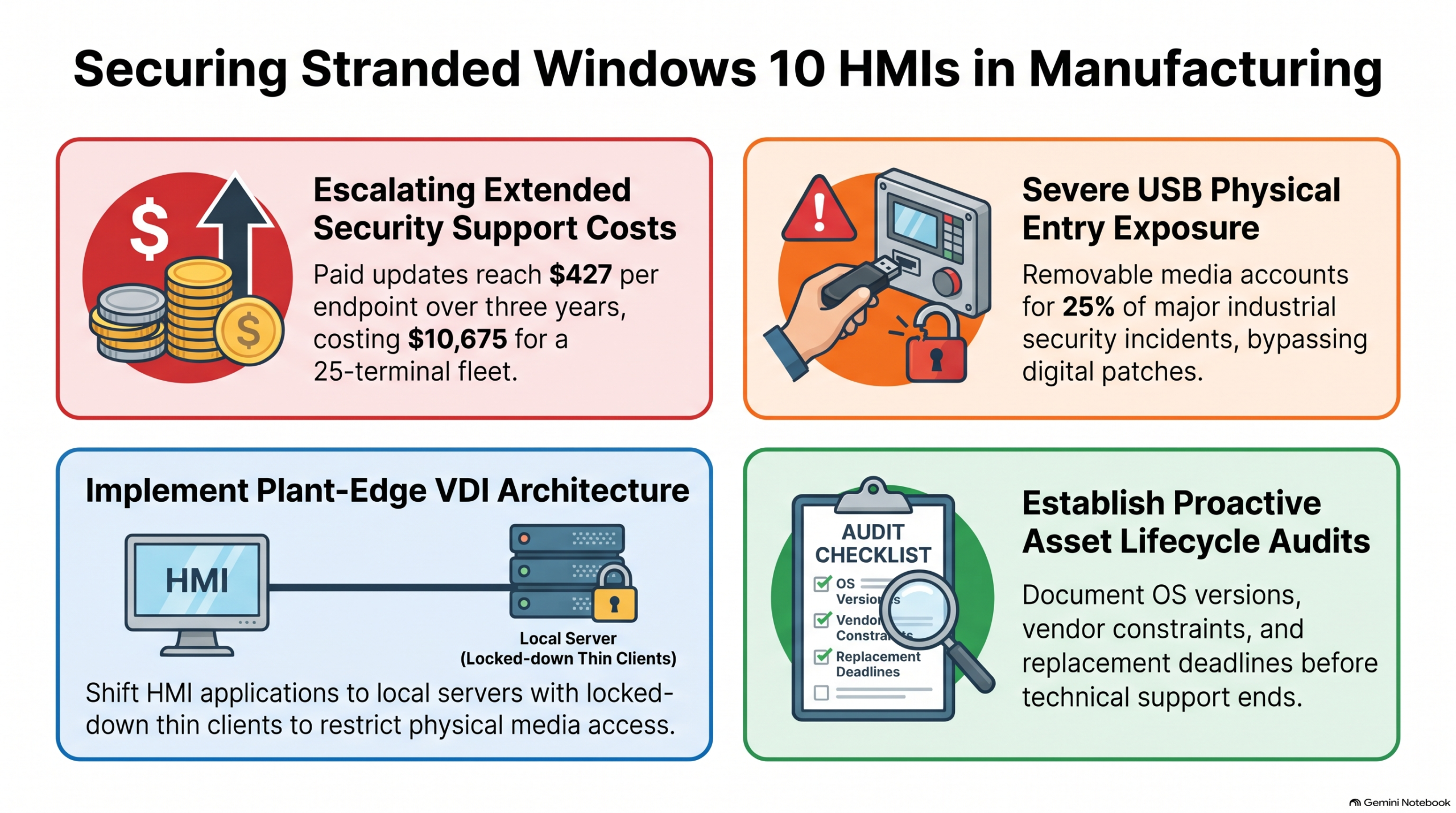
The final installment adds $244 for protection from October 13, 2027, through October 10, 2028. That brings the three-year total to $427 per endpoint, or $10,675 across 25 terminals. Apply this rate to your HMI fleet and account separately for deployment labor and application support. The subscription supplies critical and important security updates that address software vulnerabilities but leaves physical USB access as a separate exposure to control.
Every Stranded HMI Is Also a Physical Entry Point
Operators often use USB drives to transfer recipes, update firmware and run diagnostics at HMIs, PLC interfaces and inspection terminals. However, there are risks associated with this activity. Honeywell’s 2025 Cyber Threat Report recorded 84 USB plug-and-play incidents, accounting for 25% of events across the report’s 10 most common incident categories.
These findings highlight how a familiar maintenance workflow can create an opening for malicious peripherals or infected media. Honeywell describes how attackers can exploit USB device detection behavior to execute scripts or alter settings, although successful execution depends on the peripheral, host configuration and attack technique.
The threat also includes the emergence of established malware in industrial environments. Honeywell reported a 3,000% increase in W32.Worm.Ramnit, a banking-associated credential stealer, in Q4 2024 compared with Q2 2024. Together, these findings reinforce the need to pair a supported patching path with controls over removable media and connected devices.
Plant-Edge Virtual Desktop Infrastructure (VDI) Closes the Patching and Physical Access Gap
Plant-edge VDI moves operator applications to on-premises servers, reducing the software and data exposed at floor terminals. With authentication, licensing and application services available locally, sessions can continue during a wide area network outage.
Replacing industrial PCs with locked-down thin or zero client workstations and data center servers shifts hosting and data storage to managed infrastructure, where policies can restrict USB offloading. Thin clients retain a compact OS, while zero-client designs utilize dedicated protocol hardware.
Centralized management can further simplify maintenance by standardizing supported configurations and, where master images are available, allowing teams to validate changes before rollout. The hosted workloads still require ongoing support, so a virtual Windows 10 guest needs an applicable patching path as well as application and peripheral validation.
At the terminal, endpoint device controls and session-redirection policies can permit approved keyboards or scanners while blocking unauthorized mass storage. Test both layers because restrictions on server-side offloading alone do not cover every USB attack path.
The Clock Does Not Stop After This Migration
Plant-edge VDI can help address the immediate Windows 10 patch-management burden and terminal exposure, but the same life cycle pressures will eventually affect the new architecture. Its servers, hypervisors and firmware will also reach end of support, so replacement planning must continue after deployment.
The Cybersecurity and Infrastructure Security Agency notes that OT security costs vary with legacy equipment capabilities and the organization’s capital expenditures cycle. Thus, security budgets should account for each asset’s life cycle, rather than only the current OS migration.
You should evaluate future purchases against vendor-published end-of-life dates and update commitments before approval. Also, budget for maintaining validated configurations throughout the expected service life to ensure the next migration follows a planned replacement cycle.
Build the Architecture Before the Next Deadline
A floor-level audit gives production engineering and security a shared basis for migration planning. Document each stranded terminal’s OS edition, application owner, vendor-approved upgrade path and removable-media workflow while there is time to evaluate alternatives.
You can use the findings to scope a plant-edge pilot with acceptance criteria for local continuity, peripheral compatibility and device control. An assigned owner and retirement deadline for each retained Windows 10 workload can help align capital planning with a replacement schedule.

Emily Newton is the Editor-in-Chief at Revolutionized Magazine. A regular contributor to Brilliance Security Magazine, she has over four years of experience writing articles in the industrial sector.
Additional Resources
Video Overview
Infographic
Follow Brilliance Security Magazine on LinkedIn to ensure you receive alerts for the most up-to-date security and cybersecurity news and information. BSM is cited as one of Feedspot’s top 10 cybersecurity magazines.